# Managing History

## Overview

A particularly important benefit of Git is that it provides a meaningful history of file changes. With Copia, you can access your historical commits and even perform compares between commits.

This section outlines these operations for both the Desktop App and Web App.

## Managing History (Copia Desktop App) <a href="#revert-change-desktop" id="revert-change-desktop"></a>

### Viewing History

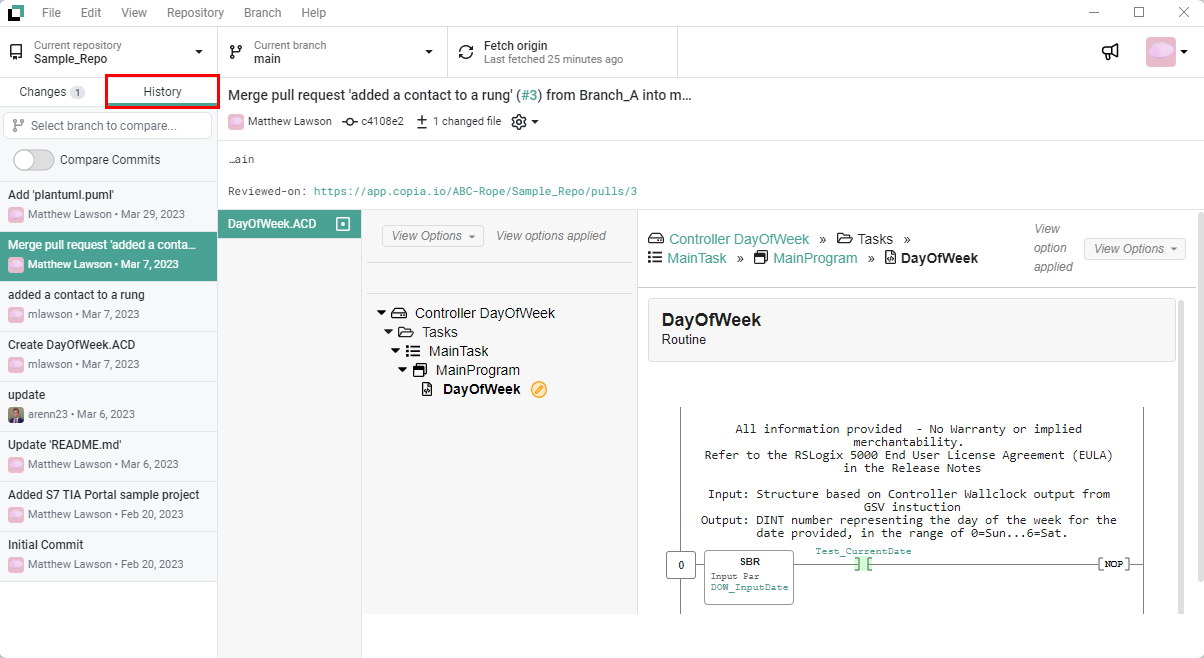
Click the *History* tab in the top left corner the Desktop App. Changes from each commit will be rendered in the panel to the right.

<figure><img src="https://3704730939-files.gitbook.io/~/files/v0/b/gitbook-x-prod.appspot.com/o/spaces%2F4lSQNVI3DZ15V7kjkMCA%2Fuploads%2FNBu9D0fGZbUT3bWHBWkH%2FRepoHistory.png?alt=media&#x26;token=d7dd48c3-429a-4931-843e-3c0df1bf1a28" alt=""><figcaption></figcaption></figure>

{% hint style="info" %}
To learn about how to manage your commit history, check out the [Managing History](https://docs.copia.io/docs/~/changes/t06B1BUttWTnUfBKsNhr/git-based-source-control/basic/making-changes/managing-history) section.
{% endhint %}

### Comparing between Commits in the Same Branch

To display the difference between two non-sequential commits on a given branch, select the *History* tab and activate the *Compare Commits* feature.

![](https://3704730939-files.gitbook.io/~/files/v0/b/gitbook-x-prod.appspot.com/o/spaces%2F4lSQNVI3DZ15V7kjkMCA%2Fuploads%2F8gkXPsj4vGR8E3Mxoe4J%2FDesktopApp_CompareToggle.png?alt=media\&token=8b88fad9-c226-4314-96d1-a90c6d34a75e)

Select the two commits you wish to compare by checking them. Once two commits have been chosen, a comparison is performed from the oldest to the most recent commit.

![](https://3704730939-files.gitbook.io/~/files/v0/b/gitbook-x-prod.appspot.com/o/spaces%2F4lSQNVI3DZ15V7kjkMCA%2Fuploads%2FVOFezbU0sZTxALKTgZ23%2FDesktopApp_SameBranch_Compare.png?alt=media\&token=22848aff-e36b-4271-8fa3-929c515f241e)

### Comparing between Commits in Separate Branches

If your repository has more than one branch, you can also perform a compare between commits in different branches.

First, choose the branch by clicking the *Select branch to compare* field.

![](https://3704730939-files.gitbook.io/~/files/v0/b/gitbook-x-prod.appspot.com/o/spaces%2F4lSQNVI3DZ15V7kjkMCA%2Fuploads%2FyPRnLP6pLycLrDLJlxWu%2FDesktopApp_CompareToggle_SelectBranch.png?alt=media\&token=5753e623-807a-445e-8be8-6a73eff6a3c6)

After making a branch selection, you can activate the *Compare Commits* toggle,

![\\](https://3704730939-files.gitbook.io/~/files/v0/b/gitbook-x-prod.appspot.com/o/spaces%2F4lSQNVI3DZ15V7kjkMCA%2Fuploads%2FJwIxIiZkUadOzrjElJXS%2FDesktopApp_CompareToggle_SelectBranch_On.png?alt=media\&token=108ab0e5-5002-4a80-b191-5828d42e52ab)

You can now select a commit from the Ahead and Behind sections to compare commits that are different between the two branches.

![](https://3704730939-files.gitbook.io/~/files/v0/b/gitbook-x-prod.appspot.com/o/spaces%2F4lSQNVI3DZ15V7kjkMCA%2Fuploads%2FNwE5Tpr9DhKNY8GRCVdz%2FDesktopApp_CrossBranch_Compare.png?alt=media\&token=eb450a9a-1df7-4105-964e-94a3c312b5bc)

{% hint style="info" %}
The ability to compare commits within the same branch and across separate branches is currently only possible in the Desktop App.
{% endhint %}

## Managing History (Copia Web App) <a href="#revert-change-desktop" id="revert-change-desktop"></a>

### Viewing History

The history for your repository is also viewable in the Web App. Navigate to your repository and click on the *Commits* button. You will see a list of commits for that repository.

![](https://3704730939-files.gitbook.io/~/files/v0/b/gitbook-x-prod.appspot.com/o/spaces%2F4lSQNVI3DZ15V7kjkMCA%2Fuploads%2F2zYvonV1uqUaPbZYvI0F%2FWepApp_ViewHistoryWeb.png?alt=media\&token=779fda21-5b42-40b8-9dd2-c5ddd5dae578)

### Retrieving a Previous Version <a href="#retrieve-previous-revision-web" id="retrieve-previous-revision-web"></a>

You can manage your commit history to retrieve a previous version of a file. Click on the commit that you care about.

![](https://3704730939-files.gitbook.io/~/files/v0/b/gitbook-x-prod.appspot.com/o/spaces%2F4lSQNVI3DZ15V7kjkMCA%2Fuploads%2F00nxk9XlziyRDitIYgSi%2FWebApp_SelectCommit_Compare.png?alt=media\&token=6760981a-3d0e-486e-b324-3515100d0daa)

You should now see the changes in that commit. Click on the *View File* button.

![](https://3704730939-files.gitbook.io/~/files/v0/b/gitbook-x-prod.appspot.com/o/spaces%2F4lSQNVI3DZ15V7kjkMCA%2Fuploads%2FudyrReZj26WdPllMcqxB%2FWebApp_SelectViewFile_Compare.png?alt=media\&token=4ef3fab9-09a5-44aa-aab7-d57c34b899bd)

Click the *Download* button to review the full contents of the file.

![](https://3704730939-files.gitbook.io/~/files/v0/b/gitbook-x-prod.appspot.com/o/spaces%2F4lSQNVI3DZ15V7kjkMCA%2Fuploads%2FHzB2qPiDMkgsYgebMkwy%2FWebApp_SelectDownload.png?alt=media\&token=cfbe76f4-c298-47f9-ad16-815df8d157af)